
Showing posts with label Review. Show all posts
Showing posts with label Review. Show all posts
There's only one place to see the future of technology before it arrives: CES. Every year, the world's tech companies converge in Las Vegas to give everyone a glimpse of all the new tech gizmos and trends to come.

 Google's Tango technology has been in the works for a long time, but we didn't love the first phone that made use of this tech. The second Tango phone, ASUS' ZenFone AR, addresses most of our biggest concerns. It's actually pocketable, for one, and packs a high-end Snapdragon chipset, along with a whopping 8GB of RAM. It's more than just an AR machine too: It also supports Google's Daydream VR platform.

ZTE's Blade line of smartphones is well-known abroad, but the company is finally bringing it to the US with the Blade V8 Pro. More importantly, it packs plenty of goodies, considering its $230 price. There's a bright 5.5-inch full HD display, for starters, along with a solid body that feels better than other mid-range phones we've seen at the show. It also rocks a surprisingly good dual camera setup. Who says every important phone has to be pricey?
Also Read : Best Of CES 2017 : Smart Devices
 The fact that the Casio WSD-F20 is one of the first smartwatches to run Android Wear 2.0 is nice, but it's the device's built-in low-power GPS and offline maps in color that have us paying closer attention. The rugged watch has new button guards and a protective bezel that make it hardier than its predecessor, which is important for its target audience. It may be pricier than a typical Android Wear watch, but the Casio WSD-F20 offers enough differentiating features to justify that premium, at least for outdoor enthusiasts.

There are plenty of activity trackers for golf, tennis and many other sports, but what about boxing? Everlast and PIQ have teamed up to attach a motion sensor to a boxing glove to track your face-punching. That data is then crunched to tell you the type of punch, impact and force that you produce during your sparring sessions. You can then post it to social media -- you know, to warn your Facebook friends not to mess with you on a night out.
 Projectors have never been this cool before. Ever. Another wild concept from Razer, Project Ariana is a projector that extends your computer display or TV onto your walls for a more immersive experience. Using two depth sensors, Ariana scans your room and then tells its 155-degree fisheye lens to project an expanded field of view around your main display. The result is an impressive interactive light and projection show that augments whatever is happening on the screen.
 NVIDIA GeForce Now is a game streaming service that lets you rent a virtual gaming PC to play your games on the move. It lets you play any game you own on something as weak as a MacBook Air, for a price.
Source : Engadget
Also Read : Consumer Electronics Show (CES) : History

Mobile Devices
ASUS ZenFone AR
Google's Tango technology has been in the works for a long time, but we didn't love the first phone that made use of this tech. The second Tango phone, ASUS' ZenFone AR, addresses most of our biggest concerns. It's actually pocketable, for one, and packs a high-end Snapdragon chipset, along with a whopping 8GB of RAM. It's more than just an AR machine too: It also supports Google's Daydream VR platform.ZTE Blade V8 Pro
ZTE's Blade line of smartphones is well-known abroad, but the company is finally bringing it to the US with the Blade V8 Pro. More importantly, it packs plenty of goodies, considering its $230 price. There's a bright 5.5-inch full HD display, for starters, along with a solid body that feels better than other mid-range phones we've seen at the show. It also rocks a surprisingly good dual camera setup. Who says every important phone has to be pricey?
Also Read : Best Of CES 2017 : Smart Devices
-------------------------
Wearable
Casio Android Wear watch
The fact that the Casio WSD-F20 is one of the first smartwatches to run Android Wear 2.0 is nice, but it's the device's built-in low-power GPS and offline maps in color that have us paying closer attention. The rugged watch has new button guards and a protective bezel that make it hardier than its predecessor, which is important for its target audience. It may be pricier than a typical Android Wear watch, but the Casio WSD-F20 offers enough differentiating features to justify that premium, at least for outdoor enthusiasts.Everlast and PIQ boxing glove
There are plenty of activity trackers for golf, tennis and many other sports, but what about boxing? Everlast and PIQ have teamed up to attach a motion sensor to a boxing glove to track your face-punching. That data is then crunched to tell you the type of punch, impact and force that you produce during your sparring sessions. You can then post it to social media -- you know, to warn your Facebook friends not to mess with you on a night out.
-------------------------
PC Tech
Razer Project Ariana
Projectors have never been this cool before. Ever. Another wild concept from Razer, Project Ariana is a projector that extends your computer display or TV onto your walls for a more immersive experience. Using two depth sensors, Ariana scans your room and then tells its 155-degree fisheye lens to project an expanded field of view around your main display. The result is an impressive interactive light and projection show that augments whatever is happening on the screen.NVIDIA GeForce Now for Mac and PCs
NVIDIA GeForce Now is a game streaming service that lets you rent a virtual gaming PC to play your games on the move. It lets you play any game you own on something as weak as a MacBook Air, for a price.Source : Engadget
Author of this post :

CES is the tech world's big coming-out party for the New Year — a supersize circus of gadgetry that both follows major trends in tech and creates them. It’s never the same year to year, but it’s always a showcase of what’s to come in consumer technology.

 Called Helia, the new line of bulbs from Soraa are LED lights that aim to recreate the feel of natural sunlight. The bulbs, which rely on sensors rather than Wi-Fi, emit bright blue light in the morning when you're waking up and then slowly reduce the amount of blue light until the sun sets and all blue light is eliminated. It's kind of light iOS's Night Shift mode and the result is light that's easier on your tired eyes (and brain) and less disruptive to your sleep.

The AIRE by FoodMarble is a portable app-connected gadget that is able to analyze the amount of gas in your bloodstream the way a breathalyzer would monitor your blood alcohol level. According to FoodMarble, certain foods that don't gel with your system cause a buildup of gas in your gut. Using a series of breath tests and food tracking, the AIRE can help you find out which foods don't agree with your body so that you can live a more comfortable life.
 The Bodyfriend Aventar looks more like a luxury sports car than something that will give you an impressive massage. When you sit in the chair it scans your body and creates a special massage just for you by measuring your shoulder height and width, leg length, weight and height. Using its connected app, you can set preferences for individual users, and set specific massages for certain areas of your body, so if you just want to get a pain out of your feet and don't want the full experience, you can select just a foot massage. Best of all, the chair’s got a 5.1 speaker system that connects wirelessly to your TV.
Also Read : Best Of CES 2016 : Smart Devices
 Willow's hands-free breast pump could be a game-changer for new mothers tired of noisy and cumbersome electric breast pumps. The set of two wearable pumps slip into the wearer's bra and simply pump until its bags are full. The product is remarkably quiet, so it can be worn out of the house while women go about their daily activities. Willow is also FDA-approved and simple to clean, with parts that are dishwasher safe. Of course, an intuitive, hands-free pump doesn't come cheap -- when it launches this spring, it will retail for $429.99, plus $0.50 per milk storage bag.
 PowerRay is an underwater drone for fishing that's able to dive to around 100 feet. Equipped with sonar, PowerRay can detect fish at distances of up to 120 feet beneath it and lure them in with a special fish-attracting light. Should the day's potential catch still prove to be elusive, PowerRay has a remote-controlled bait-drop system that should do the trick. For the pilots up on deck, there's WiFi connectivity and a real-time video feed from the onboard 4K camera of what's going on down below. For the real high-tech angler, that video feed can also be viewed in, and controlled by, VR goggles.
 Lego creations are about to get way more fun. Priced at $160 per set, the new Lego Boost teaches your kids how to bring their building blocks to life with code. Thanks to a mix of sensors and motors, the Lego creation can be programmed with an app to follow different commands, like moving or rolling around depending on what you're building. There are five different models, including a cat and a guitar. The Boost will be available in August.
Also Read : Best Of CES 2017 : Mobile, Wearable & PC
Source1 : Mashable Source2 : Engadget

Smart Devices
Helia Smart Light Bulbs
Called Helia, the new line of bulbs from Soraa are LED lights that aim to recreate the feel of natural sunlight. The bulbs, which rely on sensors rather than Wi-Fi, emit bright blue light in the morning when you're waking up and then slowly reduce the amount of blue light until the sun sets and all blue light is eliminated. It's kind of light iOS's Night Shift mode and the result is light that's easier on your tired eyes (and brain) and less disruptive to your sleep.AIRE Digestive Tracker
The AIRE by FoodMarble is a portable app-connected gadget that is able to analyze the amount of gas in your bloodstream the way a breathalyzer would monitor your blood alcohol level. According to FoodMarble, certain foods that don't gel with your system cause a buildup of gas in your gut. Using a series of breath tests and food tracking, the AIRE can help you find out which foods don't agree with your body so that you can live a more comfortable life.
Bodyfriend Aventar Massage Chair
The Bodyfriend Aventar looks more like a luxury sports car than something that will give you an impressive massage. When you sit in the chair it scans your body and creates a special massage just for you by measuring your shoulder height and width, leg length, weight and height. Using its connected app, you can set preferences for individual users, and set specific massages for certain areas of your body, so if you just want to get a pain out of your feet and don't want the full experience, you can select just a foot massage. Best of all, the chair’s got a 5.1 speaker system that connects wirelessly to your TV.Also Read : Best Of CES 2016 : Smart Devices
Willow Hands-free Breast Pump
Willow's hands-free breast pump could be a game-changer for new mothers tired of noisy and cumbersome electric breast pumps. The set of two wearable pumps slip into the wearer's bra and simply pump until its bags are full. The product is remarkably quiet, so it can be worn out of the house while women go about their daily activities. Willow is also FDA-approved and simple to clean, with parts that are dishwasher safe. Of course, an intuitive, hands-free pump doesn't come cheap -- when it launches this spring, it will retail for $429.99, plus $0.50 per milk storage bag.PowerRay underwater fishing robot
PowerRay is an underwater drone for fishing that's able to dive to around 100 feet. Equipped with sonar, PowerRay can detect fish at distances of up to 120 feet beneath it and lure them in with a special fish-attracting light. Should the day's potential catch still prove to be elusive, PowerRay has a remote-controlled bait-drop system that should do the trick. For the pilots up on deck, there's WiFi connectivity and a real-time video feed from the onboard 4K camera of what's going on down below. For the real high-tech angler, that video feed can also be viewed in, and controlled by, VR goggles.Lego Boost
Lego creations are about to get way more fun. Priced at $160 per set, the new Lego Boost teaches your kids how to bring their building blocks to life with code. Thanks to a mix of sensors and motors, the Lego creation can be programmed with an app to follow different commands, like moving or rolling around depending on what you're building. There are five different models, including a cat and a guitar. The Boost will be available in August.Also Read : Best Of CES 2017 : Mobile, Wearable & PC
Source1 : Mashable Source2 : Engadget
Author of this post :
“ Creativity knows no limits ”
This one phrase tells us all about the new and exciting blend of mobility and robust configurability HP ZBook 15 Mobile Workstation…….

It’s the perfect mix of style, features, and portability. No one really needs an introduction to NASA (National Aeronautics and Space Administration) or what it does? But there is one project involved that is running the ISS (International Space Station), which sustains the human crews conducting crucial experiments beyond the Earth’s atmosphere.
What is ISS?
ISS is a joint project with five space agencies, including NASA, Roskosmos of Russia, Japan Aerospace Exploration Agency, Canadian Space Agency, and the European Space Agency. The computers on the ISS are upgraded every six years, and this time they have selected HP Zbooks.
You ask why??
Well, then-The Z Workstations are literally everything that the ISS mission depends on- tied-in to ISS life-support, vehicle control, maintenance, and operations systems. They provide mission support for onboard experiments, email, entertainment, and more. In short-everything the astronauts on the ISS need to survive and communicate and research with.
Why they choose HP Zbooks?
NASA chose the HP ZBook 15 Mobile Workstations because of its performance and reliability that HP builds into their mobile workstation solutions. With advanced capabilities that are typically not available in notebooks, like 3D graphics, powerful processors, and massive memory, crew members can be a lot more efficient—even the boot-up timings are scrutinized when an astronaut’s time is worth more than $100,000 an hour.

DESCRIPTION:
Conquer the professional space with the perfect combination of brains and beauty. The iconic 15.6" diagonal HP ZBook Studio is HP’s thinnest, lightest, and most attractive full performance mobile workstation. With dual 1 TB HP Z Turbo Drive G2 of total storage, 32 GB ECC memory, and optional HP Dream Color UHD or FHD touch displays, this is a killer from HP’s stable.
Work confidently with HP mobile workstations designed around 30 years of HP Z DNA with extensive ISV certification. The all new ZBook Studio G3 is reliable, designed to pass MIL-STD 810G testing, and has endured 120K hours of testing in HP's Total Test Process.
For the techies, reduce boot up, calculation, and response time because the trend setting HP ZBook handles large files with optional dual 1 TB HP Z Turbo Drive G storage for a remarkably fast and innovative solution. Quickly and easily transfer data and connect to devices. This mobile workstation is packed with multiple ports including dual Thunderbolt 3 ports, HDMI, and more.
“Thus we can say a HP ZBook makes your statement bold and performance better.”
Author of this post :

The Bluetooth Special Interest Group (SIG) officially adopted Bluetooth 5 as the latest version of the Bluetooth core specification this week.
Key updates to Bluetooth 5 include longer range, faster speed, and larger broadcast message capacity, as well as improved interoperability and coexistence with other wireless technologies. Bluetooth 5 continues to advance the Internet of Things (IoT) experience by enabling simple and effortless interactions across the vast range of connected devices.

Bluetooth 5 also includes updates that help reduce potential interference with other wireless technologies to ensure Bluetooth devices can coexist within the increasingly complex global IoT environment. Bluetooth 5 delivers all of this while maintaining its low-energy functionality and flexibility for developers to meet the needs of their device or application.
Source: Bluetooth.com
Key updates to Bluetooth 5 include longer range, faster speed, and larger broadcast message capacity, as well as improved interoperability and coexistence with other wireless technologies. Bluetooth 5 continues to advance the Internet of Things (IoT) experience by enabling simple and effortless interactions across the vast range of connected devices.

"Bluetooth is revolutionizing how people experience the IoT. Bluetooth 5 continues to drive this revolution by delivering reliable IoT connections and mobilizing the adoption of beacons, which in turn will decrease connection barriers and enable a seamless IoT experience." Mark Powell, Executive Director of the Bluetooth SIGKey feature updates include four times range, two times speed, and eight times broadcast message capacity. Longer range powers whole home and building coverage, for more robust and reliable connections. Higher speed enables more responsive, high-performance devices. Increased broadcast message size increases the data sent for improved and more context relevant solutions.
Bluetooth 5 also includes updates that help reduce potential interference with other wireless technologies to ensure Bluetooth devices can coexist within the increasingly complex global IoT environment. Bluetooth 5 delivers all of this while maintaining its low-energy functionality and flexibility for developers to meet the needs of their device or application.
Consumers can expect to see products built with Bluetooth 5 within two to six months of today’s release.
Source: Bluetooth.com
Author of this post :
Apple announced macOS Sierra, the next version of its computer operating system for Macs shipping this fall as a free update. It'll be available as a developer preview in July.

As has been customary since it stopped naming the OS after big cats, the latest operating system version has a moniker inspired by California and will be known as macOS Sierra. Apple has stopped referring to its Mac operating system as OS X, however.

As has been customary since it stopped naming the OS after big cats, the latest operating system version has a moniker inspired by California and will be known as macOS Sierra. Apple has stopped referring to its Mac operating system as OS X, however.

macOS Sierra: What will it feature?
Siri
Siri, Apple's personal voice assistant, finally makes its debut on the Mac. The feature lives in the Mac’s Menu Bar as a Siri icon.

Working with files is a big part of using a Mac. And Siri makes it a snap. Can’t remember where you saved that report? Ask Siri to search for the documents you opened this week, then refine your results to just the ones with the word “annual” in the title. "Show the files I worked on last week about the offsite."
Of course you can check messages, the weather, set reminders, start a FaceTime call, and ask any questions you can think of, just like you can on the iPhone, iPad or Apple Watch too.
 Apple Pay is also coming to the Mac via the web. "So now when you're shopping online, you'll have a pay with Apple Pay button," Apple's senior vice president of Software Engineering Craig Federighi said. Authentication is made with your iPhone's Touch ID fingerprint sensor.
For sites and online stores that support Apple's payment service, anyone will be able to tap the "Pay with Apple Pay" button and have a notification pop up on their phone.
 Auto-unlock is one new feature that lets you automatically unlock your Mac when it detects you're wearing your Apple Watch right near it.
It can tell when you’re nearby - by detecting your Apple Watch or iPhone - and then simply unlocks your Mac, and doesn't ask for your password. What's more, it can tell that it's you and won't just unlock with anyone's iPhone or Apple Watch nearby, so it's secure.
 iCloud Drive will now let you get access to the files on your desktop from any other Mac, or even from your iPhone or iPad. Any files you have saved on your desktop on a Mac, or within the Documents folder, will automatically show up in iCloud Drive. On an iPhone or iPad you can get access to them by using the iCloud Drive app, and if you have a PC you can use iCloud.com or the iCloud for Windows app. What's more, if you have a second Mac, the files automatically become available on the desktop and in the Documents folder.
 Like iOS 10, the Messages app for macOS Sierra is getting a feature overhaul bringing web link previews and in-app video watching, reactions, and bigger, better emoji.
It essentially works by moving anything you don't use often in to iCloud, reminding you to delete things like used app installers or disk images, and clears out duplicate downloads, logs and caches. It basically removes stuff you didn't even know was there, which is more than likely taking up space you could be using for something else. In the past, this has been achieved by downloading third party apps like CleanMyMac, but it's now being built right in to the operating system.
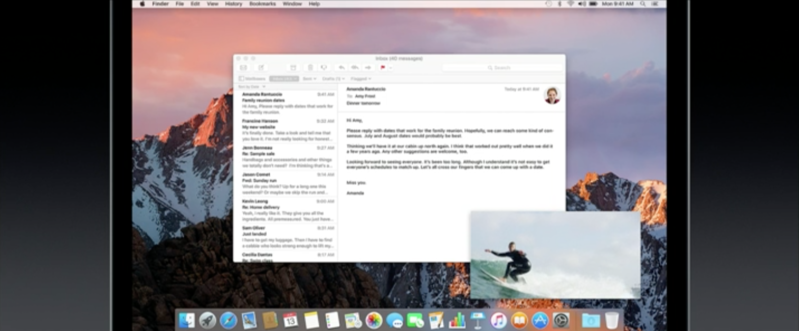
 With Picture in Picture, you’ll be able to have a small video window play while you continue with your main functions. Videos in Safari and iTunes will have a new pop-out icon. Click on it, and the video leaves the web page and takes up its own small window on screen. You'll also be able to resize this window, just like you can on the iPad. What's more, it follows you when you switch between desktop spaces, so you never lose sight of what you're watching.
 Apple has built a lot of smarts in to its Mac Photos app. Similar to Google Photos, it can create curated collections of important occasions without you having to do anything. It's also been trained to recognize people, places and objects and groups them accordingly.

Working with files is a big part of using a Mac. And Siri makes it a snap. Can’t remember where you saved that report? Ask Siri to search for the documents you opened this week, then refine your results to just the ones with the word “annual” in the title. "Show the files I worked on last week about the offsite."
Of course you can check messages, the weather, set reminders, start a FaceTime call, and ask any questions you can think of, just like you can on the iPhone, iPad or Apple Watch too.
Apple Pay
 Apple Pay is also coming to the Mac via the web. "So now when you're shopping online, you'll have a pay with Apple Pay button," Apple's senior vice president of Software Engineering Craig Federighi said. Authentication is made with your iPhone's Touch ID fingerprint sensor.
For sites and online stores that support Apple's payment service, anyone will be able to tap the "Pay with Apple Pay" button and have a notification pop up on their phone.
Auto Unlock
 Auto-unlock is one new feature that lets you automatically unlock your Mac when it detects you're wearing your Apple Watch right near it.
It can tell when you’re nearby - by detecting your Apple Watch or iPhone - and then simply unlocks your Mac, and doesn't ask for your password. What's more, it can tell that it's you and won't just unlock with anyone's iPhone or Apple Watch nearby, so it's secure.
Universal Clipboard
Universal clipboard is another new continuity feature, which lets you easily and quickly copy and paste information between iOS and Mac devices near each other. What that means in simple terms is that if you copy an image, or a selection of text or a video on your iPhone, you'll be able to paste that on to a document or email from your Mac. Or vice versa.
Desktop and Documents on all devices
 iCloud Drive will now let you get access to the files on your desktop from any other Mac, or even from your iPhone or iPad. Any files you have saved on your desktop on a Mac, or within the Documents folder, will automatically show up in iCloud Drive. On an iPhone or iPad you can get access to them by using the iCloud Drive app, and if you have a PC you can use iCloud.com or the iCloud for Windows app. What's more, if you have a second Mac, the files automatically become available on the desktop and in the Documents folder.
Messages app overhaul
 Like iOS 10, the Messages app for macOS Sierra is getting a feature overhaul bringing web link previews and in-app video watching, reactions, and bigger, better emoji.
Optimised Storage
Optimised storage lets you automatically move stuff from your Mac into the cloud, or even deletes stuff you don’t need. With all the automatic options switched on, Apple uses the example of increasing 20GB available storage to up to 150GB.It essentially works by moving anything you don't use often in to iCloud, reminding you to delete things like used app installers or disk images, and clears out duplicate downloads, logs and caches. It basically removes stuff you didn't even know was there, which is more than likely taking up space you could be using for something else. In the past, this has been achieved by downloading third party apps like CleanMyMac, but it's now being built right in to the operating system.
Tabs
Part of macOS Sierra is a new Tabs API which lets software engineers add tabs to any apps, without much work from those developers. Like Finder and Safari, creating tabs will be simple for the user too. Any app that supports multiple windows will get support for tabs, meaning you can - for instance - have Maps open in multiple locations at once, or you can switch between more than one Mail email draft, or even copy and paste text between different Pages documents without needing more than one window open on screen.Picture in Picture
Photos app memories
 Apple has built a lot of smarts in to its Mac Photos app. Similar to Google Photos, it can create curated collections of important occasions without you having to do anything. It's also been trained to recognize people, places and objects and groups them accordingly.
macOS Sierra: Release date
macOS Sierra is available as developer preview now, and a public beta being launched a little later this summer, in July. For those who don’t want to play with a non-finished version, the update will be ready for consumers by around October/November time.
Author of this post :

Apple announced the latest edition of its modile platform. iOS 10 claims it’s the biggest iOS release since its inception and here are the 10 new major features Apple accented on during its presentation:
1. User interface
 Apple has redesigned the lockscreen. It now supports pick up to wake and has an easier way to access the camera - just swipe left. If you swipe right you'll find your widget page. Just when Android mostly ditched the widgets on the lockscreen Apple is bringing them back.

 The notification area has been redesigned with new bubble-like notifications and widgets. The Control Center is now comprised of two panes - one with toggles and one with music controls. Its design also features bubbles. There is a third Control Center Tab if you are using the new Home app - shortcuts for your home accessories.
Apple has given the 3D Touch a lot more power - you can now glimpse more information from notification or even apps on the homescreen, by using 3D Touch. And if you like what you are seeing, you can snap it as a widget on your brand new Today page (the leftmost homescreen pane).
2. Siri
 Siri. Now open to apps. Siri works with your favorite apps from the App Store, so you can ask it to book a ride through Lyft, or send money to someone with Square.
Siri got its own update with new features. But it's biggest change is the opening Siri to developers. Now it can send messages via non-Apple message clients, it can reserve Uber cars, among others. It can even search photos through various third-party photo apps, it can make VoIP calls, or send payments.
3. QuickType keyboard
 The keyboard has been enhanced with Siri's intelligence and it can now sense what you want to say or answer. It can read through your messages and suggest creating events, share you location, remember your recent addresses, and the best part is it now supports multilingual typing.
4. Photos

 The Photos app has learned a few new tricks, which are quite familiar as they have been on Android for years. The app can now show your photos on a map, you sort them by the faces of your friends.
A cool new feature is the AI sorting in Memories, which scans your photos and sorts them in automatic albums by landmarks, animals, people, topics, and various other criteria.
5. Maps
 The Maps app is getting a boost with Map layers, smarter and proactive assistance as well. The Maps also supports extensions - it can help you throughout your day by offering the fastest routes by following all the traffic around you and suggesting places nearby. It can also make reservations.

- Maps. Now taking reservations. Book a table through apps like OpenTable, and a ride with Uber — all within Maps.
- Street smarter. Maps can make proactive suggestions for where you’re likely to go and the fastest way to get there.
- Search along your route. See what’s around the corner and easily find the closest places for gas, food, or coffee. Maps even tells you how much extra time it will take to arrive.
 6. Apple Music
Apple Music got a new refined interface, which makes easier to find the music you like and organize it.
Music. Redesigned. The simple, intuitive design makes it even easier to enjoy your favorite songs. You can also view the lyrics while you’re listening to them.
 7. News
The same goes for News - it has a brand new interface. It can also create subtopics for you - i.e. if you like to read about Euro 2016, the News app will automatically create a subcategory for Euro 2016.
The News app supports subscriptions, so you can get all free and paid content in one place - the News app. Breaking News notification on the homescreen are also a novelty brought by the update.
8. Home app with even more powerful Home Kit
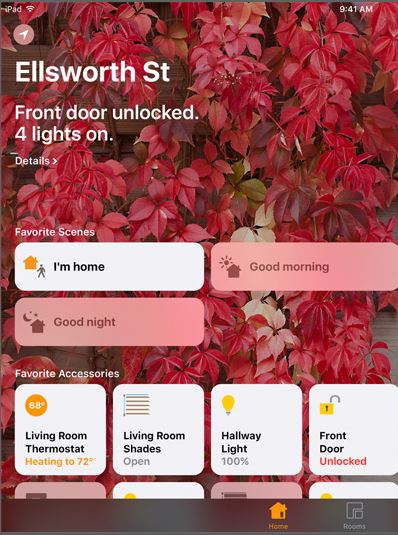 Apple wants you to control everything in your home via the new Home app. It supports virtually every popular smart electronic accessory and you can control them all from your iPhone - lamps, bulbs, doors and locks, cameras, air conditioners, fans, outlets, humidifiers, doorbells, among many others.
The Home app supports 3D Touch, which provides scrubbers for, say, volume up/down, or launches a pop-up with live feed to a camera. Finally, the Control Center now has a third tab with toggles for your most used smart accessories.
9. Phone

 Apple has updated the Phone app with some new features. All third-party VoIP apps can now use the same calling screen as your default Phone app. Skype, Viber or other - they all get full-screen notification with a photo, some options and a big answering slider.
In the phonebook you can now choose with what app you want to call a specific number, which is nice. The Voice Mail now can show you a full transcription of the message if you like. And it can now detect if a message from an unknown number is a spam or not even before it gets into your voicemail.
10. Messages
Finally, the Messages app has been enhanced. First - it supports live GIF and video playback right within the app. Any multimedia that could be played - you can play it within the messaging thread.


Next you get quick access to your photos and live camera feed without leaving the app. The interface looks quite nice and lots of people will appreciate it. The Emojis are now 3x bigger and you can replace words with Emojis by just tapping on them.


The Bubble Effects we found quite captivating. You can apply different effects to your iMessages, you can even opt for scratch to reveal. There are similar effects available for the full messaging screen (such as fireworks).
The Messages app now supports handwritten messages, too. Digital Touch message option is available as well. You bet stickers are also coming with the new app. The Messages app is now open to developers, too, so you can expect various mini iMessages apps to pop-up in the App Store and enhance your experience.
And the rest...
The iOS 10 has a few more features added to other system apps :- The Notes now supports collaboration between different contributors.
- The Mail supports conversation view and Side-by-side Mail compose in iPad.
- The Live Photos are now digitally stabilized and you can edit them if you like.
- Read receipts by conversation and Markup in iMessages.
- Faster FaceTime connectivity.
- CarPlay app reordering and CarPlay on ultrawide screens.
- Bedtime Alarm.
- Toll avoidance in Maps and Air quality index and air quality maps for China.
- Finally, the Safari on the iPad gets spiltscreen view and Unlimited tabs in Safari.
Privacy
Finally Apple has taken steps to enhance privacy - the new iOS 10 has end-to-end encryption, all intelligence and suggestions are happening on-device - there is nothing in the cloud or Apple's servers, there is no user profiling, and all privacy data is not shared between apps.iOS 10 is compatible with these devices.
| iPhone | iPad |
|---|---|
| iPhone 6s | iPad mini 3 |
| iPhone 6 | iPad mini 4 |
| iPhone 6 Plus | iPad Pro 12.9-inch |
| iPhone SE | iPad Pro 9.7-inch |
| iPhone 5s | iPad Air 2 |
| iPhone 5c | iPad Air |
| iPhone 5 | iPad 4th gen. |
Author of this post :


